www.printerland.co.uk
The UK's no.1 for Printers & Ink
0800 840 1992 Call us FREE Mon - Fri 8:30am - 6:00pm
FREE Delivery on all Orders Over £125
0 Items £0.00
Lexmark » Lexmark All-In-One & Inkjet Printers »

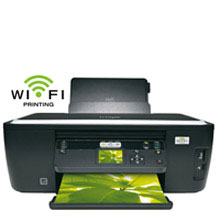
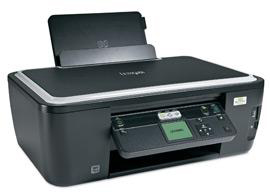
Lexmark Intuition S505 A4 Colour All-in-One Inkjet Printer

Lexmark Intuition S505 A4 Colour All-in-One Inkjet Printer
Print/Scan/Copy
90T5036
FREE Next Day Delivery*
Print. Copy. Scan.
Only £119.00 ex VAT
£142.80 Inc VAT

Lexmark Intuition S505 Overview


  • Windows & Mac
  • 4800 x 1200 dpi Print
  • 100 Sheet Input Tray
  • 2.4" Colour LCD Screen
  • Automatic Double Sided Printing
  • 30ppm Colour Print
  • USB & Wireless
  • 33ppm Mono Print
Lexmark Intuition S505 in More Detail

Print from multiple computers located virtually anywhere in your home or office with wireless networking. Save time with print speeds up to 33 ppm black and 30 ppm colour. Enjoy 4x6” photo prints in as little as 24 seconds. Manage your photos with the 2.4” colour LCD, cardslots and Pictbridge which allow for photo and file printing directly from memory cards, digital cameras and portable memory devices. Save money and the environment with automatic 2-sided printing, which can cut your paper consumption up to 50%, and EcoMode energy saving features. Print with confidence knowing you’re covered by Lexmark’s 3-year Protection Guarantee with lifetime phone support. Be efficient with the wireless Lexmark Intuition that delivers easy-to-use, advanced print, photo, copy and scan features including 2.4” color LCD and automatic 2-sided printing.

Black Ink Cartridge (170 pages)
CMY Ink Cartridges (200 pages)
Printhead
Quick Setup Guide
Quick Reference Guide
Network Guide
Installation Software CD
Power Supply
Service Information & Statement of Limited Warranty


Specification Name
Value
Product Summary
Lexmark Intuition S505 A4 Colour Inkjet Printer
Multifunction Summary
Print/Scan/Copy
Speed Colour
30ppm
Speed Monochrome
33ppm
Mono or Colour Printer
Colour
Copy Speed Monochrome
15ppm
Copy Speed Colour
9ppm
Paper Handling Input 1
100 Sheet Input Tray
Copier Reduce/Enlarge
25 to 400%
Printer Resolution
4800 x 1200 dpi
Scanner Optical Resolution
1200 x 2400 dpi
Technology
All-in-One Inkjet Printer
Interface Type(s)
USB & Wireless
Product Group Output
A4
Double Sided Printing
Automatic
Wireless System
Wireless 802.11 b/g
Direct Printing Port
1 x PictBridge
USB Ports
1 x USB 2.0
Case Colour
Black
Dimensions
46.5cm (W) x 35.8cm (D) x 17.8cm (H) - Weight 5.3kg
Copy Facility Present
Yes
Scan Facility Present
Yes
Maximum Paper Size
A4
Media Supported
Card Stock Envelopes Labels Plain Paper Transparencies Banner (A4 or Letter) Hagaki Card Iron-On Transfers Photo Paper Heavy Weight Matte Paper
Sony Memory Stick
Sony Memory Stick, Memory Stick PRO Secure Digital (SD) Card Sony Memory Stick Duo (with adapter) Sony Memory Stick PRO Duo (with adapter)
Number of Print Cartridges
4 (black, cyan, magenta, yellow)
Secure Digital
Mini Secure Digital (Mini SD) Card (with adapter) Micro Secure Digital (Micro SD) Card (with adapter) Secure Digital High Capacity (SDHC) Card (with adapter)
xD-Picture Card
xD Card xD Card Type M, Type H
MultiMedia Card
MultiMediaCard (MMC) RS-MMC (with adapter) MultiMediaCard (MMC) Mobile (with adapter)
Certifications
Energy Star, CSA, c-UL-us, ICES Class B, Executive Order 132221, CE Class B, CB IEC 60950 IEC 60825-1, GS (T V), SEMKO, C-tick mark Class B, V85, CCC Class B, BSMI Class B, METI(PSE), VCCI Class B, FCC Class B, UL 60950 3rd Edition, CCIB
Operating Systems Supported
Windows & Mac
Noise Level
50dbA
Colour Copier
Yes
Network Ready
-
USB Port
Yes
Parallel Port
-
Serial Port
-
Wireless Ready
Yes
Additional Paper Tray
-
Warranty
1 Year Replacement
Monthly Duty Cycle
5k Pages Per Month
Scanner Document Size
21.6 x 35.6cm
Scanner Bit Depth
48-bit
Paper Size
10 Envelope 7 3/4 Envelope 9 Envelope A4 A5 B5 Envelope C5 Envelope DL Envelope 6 3/4 Envelope A2 Baronial A6 Card B5 C6 Envelope Custom (Up to 216 x 432 mm) Hagaki Card Index Card Executive Legal Letter 4 x 6 inch L 2L Chokei 3 Chokei 4 Chokei 40 Kakugat
Paper Weight
75g/Sq m
LCD Screen
2.4" Colour LCD Screen
In The Box
Black Ink Cartridge (170 pages), CMY Ink Cartridges (200 pages), Printhead, Quick Setup Guide, Quick Reference Guide, Network Guide, Installation Software CD, Power Supply, Service Information & Statement of Limited Warranty


Intuition All-in-One Gadget Speak Review

Review Date: 6th March 2010

Author: mfreday

Following the Interpret comes the Intuition as the next model in Lexmark’s new home/small business series of All-in-One devices.

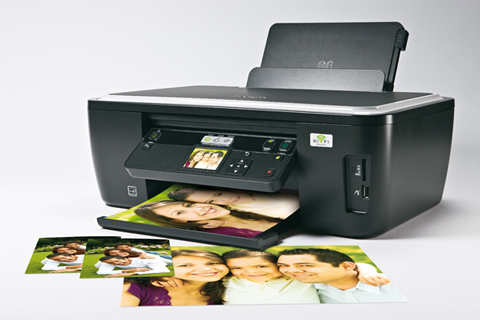
Adopting the standard approach of an A4 scanner positioned on top of an inkjet printer, the Intuition combines print, scan and copy capabilities with the additional ability to print duplex.  Connectivity is via USB or Wi-Fi.  As with the Interpret, the Intuition is predominately black in colour with computer-grey piping around the top of the unit.  Box shaped with rounded corners, the Intuition’s dimensions are 178 x 465 x 358mm (H x W x D) when in its closed state before the paper input tray at the rear and output tray at the front are extended to add to the depth and height of the box.

Setting up the printer, which requires the software to be installed first, is straightforward with step-by-step instructions being displayed on the monitor.  A print-head component needs to be placed in position before adding black, cyan, yellow and magenta cartridges.  Maybe it was a coincidence but again I struggled to lock down the magenta cartridge as happened with the Interpret.  Various automatic tests, including a print sample, are carried out to ensure everything works as it should.  Separate guides are provided for basic setup and Networking.

As mentioned earlier, an A4 flatbed scanner sits on top of the inkjet printer unit.  This scanner has a maximum scan area of 216 x 297mm with a 48-bit depth.  All the various controls for the Intuition are laid out on a front-mounted panel that can be swivelled at an angle for easier viewing and access.  This panel features a colour LCD screen which provides access to the various settings and gives feedback as to the current status.

One nice feature of this screen is that it can be used to show a preview of the current document being readied for scanning to ensure positioning is correct.  Unlike the control panel of the Interpret which tended to sink back into the body of the printer when pressure was applied to certain controls, this control panel remained firmly in place.  In fact I struggled to get it to return to its home until I discovered the release button on its underside.

Nestling alongside the control panel is an area containing memory card slots.  Included among the supported card formats are SD, SDHC, MMC, xD, SanDisk TransFlash and Sony Memory Stick Duo.  In some cases an appropriate adapter will be required.  There is also a PictBridge Certified USB port.

The Intuition has a duplex feature.  This can be used to save on paper by printing on both sides of the sheet.  This process is carried out automatically.  The only user intervention required is that the feature was turned on for the particular job.

Checking out the Intuition with my various print tests produced figures that were generally at odds with those quoted by Lexmark.  As is fairly standard, although the terminology does vary, the Intuition has the three basic print modes of Quick, Normal and Best.  While my figures for monochrome Quick and Normal modes were 37 and 25ppm compared more than favourably with Lexmark’s figures of 33 and 17ppm, when colour was introduced there was a distinct change in results.  My figures of 20 and 7ppm were a disappointment when compared to the 30 and 11ppm quoted by Lexmark.  Using Best print mode, I achieved 8.5ppm in monochrome and 2.5ppm with colour.  Although you will probably want to keep Quick mode for internal use, either Normal or Best mode would be fine for personal/business correspondence with good text quality and reasonable graphics, A 10 x 15cm colour image took 31 seconds while a full A4 colour image required 72 seconds.  However there was noticeable banding with the A4 print.  Using the Scan/Print photocopy option produced an A4 colour image in 37 seconds.

Various software items are provided with the Intuition.  The Lexmark Printer Home software provides features categorised as Photo, Scan to Text, Scan to PDF and Scan to Email.  Other software items include FineReader Sprint, Lexmark Toolbar for Web printing and Lexmark Tools for Office 2007.



All consumable life cycles are MANUFACTURER ESTIMATES based on 5% per page coverage.
images are used for illustration purposes only
why buy from Printerland?
To assist you in selecting the most suitable product
To get you the best price on your product
To deliver the item in the quickest time possible
Safe internet shopping from printerland Safe internet shopping from printerland
Join the Printerland.co.uk mailing list for the latest promotions & discount codes
Name*
 
Email*
 
*Required
printerland payment methods

The Printerland Promise...

We Will Not be Beaten on Price...
Even on Ink & Toner Cartridges! *

Free Next Day Delivery
on all Orders Over £125

Call us Free on 0800 840 1992
printerland trustpilot badge

Terms & Conditions*