
www.printerland.co.uk
The UK's no.1 for Printers & Ink
0800 840 1992 Call us FREE Mon - Fri 8:30am - 6:00pm
FREE Delivery on all Orders Over £125*
0 Items £0.00
Discontinued Printers » Discontinued HP Printers » Discontinued HP Inkjet Printers »

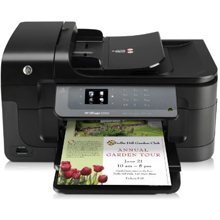
HP Officejet 6500a e A4 Colour Multifunction Inkjet Printer

Like in Facebook
HP Officejet 6500a e A4 Colour Multifunction Inkjet Printer
Print/Scan/Copy/Fax
CN555A
FREE Next Day Delivery*
Print professional documents with lowest-cost-in-class colour

HP Officejet 6500a e Overview


  • 31ppm Colour Print
  • 33.6Kbps Fax
  • 32ppm Mono Print
  • 64MB RAM
  • 250 Sheet Input Tray
  • 35 Sheet ADF
  • 4800 x 1200 dpi Print
  • HP PCL 3 GUI
  • Windows & Mac
  • USB, Network & Airprint*
  • 19,200dpi Scan
HP Officejet 6500a e in More Detail

The HP Officejet 6500A e-All-in-One is designed for micro/small business users looking for a network-ready all-in-one capable of delivering low-cost, professional-quality results
Print professional documents with lowest-cost-in-class colour
● Print professional-quality colour documents for the lowest cost per page compared with in-class all-in-ones.
● Get great value with individual inks – high capacity XL ink cartridges available for frequent printing.
● Save on external print costs too – create vivid, high impact marketing materials with HP Officejet inks.
● Produce borderless flyers and brochures with rich colour graphics using brochure or photo paper.

Experience the convenience of ‘anytime, anywhere’ printing from mobile devices
● Print from any mobile device – anywhere, anytime – directly to your all-in-one with HP ePrint.
● Access and control a full range of print, scan, copy and fax functions via the intuitive 6 cm HP TouchSmart screen.
● Capture ID card details quickly and easily – copy two-sided ID cards onto one side of paper.
● Print documents and photos directly from memory cards, without a PC, via the built-in HP TouchSmart screen

Share high productivity features across multiple PCs on your Ethernet network
● Print at speeds equivalent to a laser printer with up to 10 ppm black/7 ppm colour5; draft speeds up to 32 ppm black/31 ppm colour.
● Share the performance across your Ethernet network, or connect directly with Hi-speed USB 2.0.
● Boost productivity with a 250-sheet paper tray and 35-sheet automatic document feeder.
● Get more done with this versatile device – send digital faxes, scan instantly to a PC or e-mail, and more.

*Use of Airprint will require a firmware upgrade on the printer

HP Officejet 6500A All-in-One; HP 920 Introductory Ink Cartridges (Black Cyan Magenta Yellow); HP 920 Officejet Printhead; printer software and user's guide on CD-ROM; getting started guide; setup poster; power cable; phone cord


Specification Name
Value
Voltage/ Power/ Frequency
100 to 240VAC / 50 to 60Hz
Multifunction Summary
Print/Scan/Copy/Fax
Product Summary
HP Officejet 6500A e A4 Colour Inkjet Printer
Barcode
0885631243244
Speed Colour
31ppm
Speed Monochrome
32ppm
Mono or Colour Printer
Colour
Fax Speed
33.6Kbps
Speed Dials
100
Copy Speed Monochrome
32ppm
Copy Speed Colour
31ppm
Paper Handling Input 1
250 Sheet Input Tray
Paper Handling Input 2
35 Sheet ADF
Scanner Optical Resolution
4800dpi
Printer Resolution
4800 x 1200 dpi
Scanner Resolution Enhanced
19,200dpi
Memory (Maximum)
64MB
Technology
Multifunction Inkjet Printer
Interface Type(s)
USB, Network & Airprint*
Printer Languages
HP PCL 3 GUI
Double Sided Printing
-
Product Group Output
A4
Network Interface
Ethernet
USB Ports
1 x USB 2.0
Certifications
Energy Star
Colour Copier
Yes
Environmental
Operating Temperature 15 to 30C
Paper Handling Output
50 Sheet Output Tray
Scanner Type
Flatbed ADF
Maximum Paper Size
A4
Print Method
Thermal Inkjet
Scan Facility Present
Yes
Copy Facility Present
Yes
Automatic Document Feeder
Yes
Operating Systems Supported
Windows & Mac
Warranty
Standard one-year limited hardware warranty. Warranty and support options vary by product, country and local legal requirements.
Monthly Duty Cycle
7k Pages Per Month
Network Ready
Yes
In The Box
HP Officejet 6500A All-in-One; HP 920 Introductory Ink Cartridges (Black Cyan Magenta Yellow); HP 920 Officejet Printhead; printer software and user's guide on CD-ROM; getting started guide; setup poster; power cable; phone cord
MultiMedia Card
Secure Digital; Secure Digital High Capacity (SDHC); MultimediaCard; Secure MultimediaCard; Reduced-Size MultimediaCard (RS-MMC)/MMCmobile (adapter not included, purchase separately); MMCmicro/miniSD/microSD (adapter not included, purchase separately); xD-Picture Card; Memory Stick; Memory Stick Duo; Memory Stick PRO; Memory Stick PRO Duo
Number of Print Cartridges
4
Dimensions
47.6cm (W) x 40.9cm (D) x 25.8cm (H) - Weight 8.1kg
Scanner Bit Depth
48-bit
Colour Fax
Yes
Double Sided Printing (Duplex) Unit
Manual
Parallel Port
-
Serial Port
-
Wireless Ready
No
Additional Paper Tray
-
Broadcasting
20 locations
Maximum Copies
100
Power Cord
Country Specific
xD-Picture Card
Supported
RJ-11 Ports
1 x RJ-11 fax Port
Automatic Redial
Yes
Scanner Document Size
21.6 x 29.7cm
Scanner Features
Front-panel scan, HP Driver, Embedded Web Server
Power Consumption
50W (Max) / 36.62W (Standby) / 3.9W (Saving)
Preview Monitor Type
6 cm (480 x 234 mm) LCD (colour graphics)
USB Port
Yes
Customers also considered these products...
Free 3 Year Warranty + 0.8p per Mono page, 3.5p per Colour page
4.95 (5) only £190.00 ex  VAT
5.00
by Sue Smith
16/1/2012
HP Officejet 6500a Great value printer.

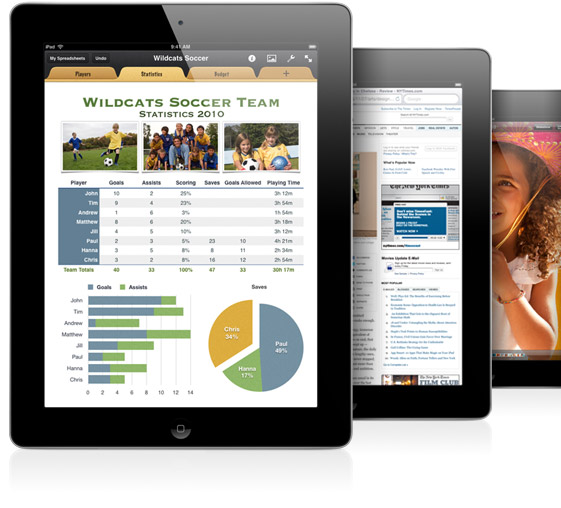
What is AirPrint?

AirPrint enables users to print wirelessly from within applications on Apple devices to AirPrint Compatible Printers. You can use your iPhone, iPod Touch or iPad to easily print via Airprint without the need to install drivers or configure the printer queue. Just tap 'print' and select your AirPrint compatible printer, and print!....It's that simple.

What You See is What You Print

If you can open it on your apple device, chances are you can print it with AirPrint and an AirPrint compatible printer. Airprint works with Safari, Mail, Photos, iWork, PDF's in iBooks and many third-party AirPrint compatible apps available from the app store.


Full list of AirPrint compatible printers

Third-Party Apps

There are also a wide variety of third-party apps available to enable wireless printing through Apple devices, even to machines that are not natively AirPrint compatible printers. By sharing a printer installed on an Apple Mac or Windows Pc over a wireless network any printer may be able to take advantage of the AirPrint features. (An additional third-party app may be required to be installed on the local machine)

Please note. Whilst every effort has been made to ensure that the above information is correct at the time of publication, Printerland will not be held responsible for the content of any third-party software suggested on this site and usage of any such software is at the users own risk. Printerland is unable to provide support for Airprint compatible printer software and any such advice should be readily available from the relevant manufacturer or developer.

What is Google Cloud Print?

With Google Cloud Print, you can print any document from anywhere to your Google Cloud Print connected printer.

When you print using Google Cloud Print, your file is securley transferred over the internet to your printer. Whether you are in the same room or even in a different country on a different continent you can print whatever you want using any device such as a smartphone, tablet PC or desktop computer.


Share with friends or colleagues

Google Cloud Print enables you to share your printer with friends, family or work colleagues with ease. From the Google Cloud management page you can share your printer securely with trusted individuals.

Scalable Printing Solution for Business

Google Cloud Print is used internally by Google employees on hundreds of printers and is designed to scale to your business demands, growing with your business or as a replacement for your existing printing infrastructure.

All consumable life cycles are MANUFACTURER ESTIMATES based on 5% per page coverage.
images are used for illustration purposes only
why buy from Printerland?
To assist you in selecting the most suitable product
To get you the best price on your product
To deliver the item in the quickest time possible
Safe internet shopping from printerland Safe internet shopping from printerland
Join the Printerland.co.uk mailing list for the latest promotions & discount codes
Name*
 
Email*
 
*Required
  • Printerland Average Customer Rating
    9.8 out of 10
    based on 1177 customer reviews.
printerland payment methods

The Printerland Promise...

We Will Not be Beaten on Price...
Even on Ink & Toner Cartridges! *

Free Next Day Delivery
on all Orders Over £125

Call us Free on 0800 840 1992
printerland trustpilot badge

Terms & Conditions*