www.printerland.co.uk
The UK's no.1 for Printers & Ink
0800 840 1992 Call us FREE Mon - Fri 8:30am - 6:00pm
FREE Next Day Delivery on all Orders Over £125*
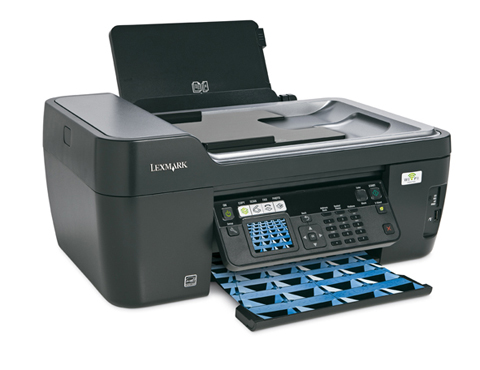
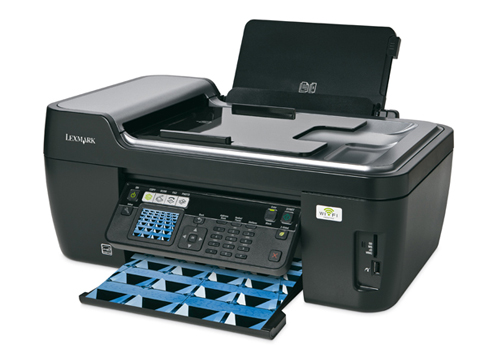
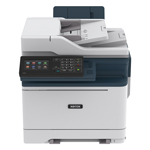
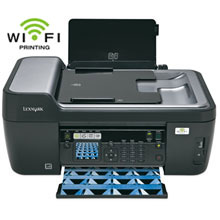
Lexmark Prospect Pro 205 A4 Colour All-in-One Inkjet Printer
Print/Scan/Copy/Fax
90T6036
Print. Copy. Scan. Fax.
Discontinued

Lexmark Prospect Pro 205 Overview


  • 30ppm Colour Print
  • 4800 x 1200 dpi Print
  • 33ppm Mono Print
  • USB & Wireless
  • 150 Sheet Input Tray
  • Automatic Double Sided Printing
  • 35 Sheet ADF
  • 2.4" Colour LCD Screen
  • 33.6Kbps Fax
  • Windows & Mac
Lexmark Prospect Pro 205 in More Detail

Lexmark Prospect Pro 205 (A4) All-in-One Colour Inkjet Wireless Printer (Print/Copy/Scan/Fax) ADF. Be more productive with the Lexmark Prospect. Print wirelessly from where you work best(1). Wi-Fi Protected Setup™ makes connecting easier and more secure. Finish time-sensitive print jobs in as fast as 33ppm(2)! Save time with included business card scanning software -- scan up to 8 business cards simultaneously and synchronize with popular contact management applications. Save paper and money with the Eco Mode button for quickly-enabled, automatic 2-sided printing(3) and energy saving mode. Enhance and view photos with the vibrant 2.4” color LCD that print in 24 seconds(4), and be confident in clear, consistent documents with new Vizix ink technology. In addition, individual ink cartridges allow you to replace one color at a time! Complete your office with the full feature fax with 99 speed dials, junk fax block and caller ID. All of this and the reassurance of a 5 year guarantee with lifetime technical support and priority phone support.(5) 1.Subject to the range of your wireless router and access to electricity; Built-in 802.11g. Compatible with WiFi certified IEEE 802.11b/g/n. 2 Printing in draft mode and excluding time to first page print. 3. Must be enabled in software for Mac users. 4. Printing from a computer in normal mode, excludes time to first page feed. See www.lexmark.com for details. In photo express mode. 5. See statement of limited guarantee for details.

Black Ink Cartridge (510 pages)
CMY Ink Cartridges (600 pages)
Printhead
Quick Setup Guide
Quick Reference Guide
Network Guide
Fax Guide
Installation Software CD
Power Supply
Service Information & Statement of Limited Warranty


Specification Name
Value
Product Summary
Lexmark Prospect Pro 205 A2 Colour Inkjet Printer
Multifunction Summary
Print/Scan/Copy/Fax
Barcode
734646148672
Speed Colour
30ppm
Speed Monochrome
33ppm
Copy Speed Monochrome
16ppm
Copy Speed Colour
8ppm
Mono or Colour Printer
Colour
Fax Speed
33.6Kbps
In The Box
Black Ink Cartridge (510 pages), CMY Ink Cartridges (600 pages), Printhead, Quick Setup Guide, Quick Reference Guide, Network Guide, Fax Guide, Installation Software CD, Power Supply, Service Information & Statement of Limited Warranty
Paper Handling Input 1
150 Sheet Input Tray
Paper Handling Input 2
35 Sheet ADF
Copier Reduce/Enlarge
25 to 400%
Printer Resolution
4800 x 1200 dpi
Scanner Optical Resolution
1200 x 4800 dpi
Technology
All-in-One Inkjet Printer
Interface Type(s)
USB & Wireless
Double Sided Printing
Automatic
Product Group Output
A4
Wireless System
Wireless 802.11 b/g
Direct Printing Port
1 x PictBridge
USB Ports
1 x USB 2.0
Fax Facility Present
Yes
Case Colour
Black
Dimensions
47.7cm (W) x 35.8cm (D) x 20.4cm (H) - Weight 7.98kg
Copy Facility Present
Yes
Scan Facility Present
Yes
Scanner Type
CIS (Contact Image Sensor)
Automatic Document Feeder
Yes
Media Supported
Card Stock Envelopes Labels Plain Paper Transparencies Banner (A4 or Letter) Hagaki Card Iron-On Transfers Photo Paper Heavy Weight Matte Paper
Sony Memory Stick
Sony Memory Stick, Memory Stick PRO Secure Digital (SD) Card Sony Memory Stick Duo (with adapter) Sony Memory Stick PRO Duo (with adapter)
Number of Print Cartridges
4 (black, cyan, magenta, yellow)
Secure Digital
Mini Secure Digital (Mini SD) Card (with adapter) Micro Secure Digital (Micro SD) Card (with adapter) Secure Digital High Capacity (SDHC) Card (with adapter)
xD-Picture Card
Supported: xD Picture Card, xD Picture card Type M, xD Picture card Type H
MultiMedia Card
Supported: MMC, RS-MMC (with adaptor), MMC Mobile (with adaptor)
Certifications
Energy Star, CSA, c-UL-us, ICES Class B, Executive Order 132221, CE Class B, CB IEC 60950 IEC 60825-1, GS (T V), SEMKO, C-tick mark Class B, V85, CCC Class B, BSMI Class B, METI(PSE), VCCI Class B, FCC Class B, UL 60950 3rd Edition, CCIB
Operating Systems Supported
Windows & Mac
Network Ready
-
USB Port
Yes
Parallel Port
-
Serial Port
-
Wireless Ready
Yes
Additional Paper Tray
-
Warranty
1 Year Replacement
Noise Level
50dbA
Colour Copier
Yes
Scanner Document Size
21.6 x 35.6cm
Scanner Bit Depth
48-bit
Paper Size
10 Envelope 7 3/4 Envelope 9 Envelope A4 A5 B5 Envelope C5 Envelope DL Envelope 6 3/4 Envelope A2 Baronial A6 Card B5 C6 Envelope Custom (Up to 216 x 432 mm) Hagaki Card Index Card Executive Legal Letter 4 x 6 inch L 2L Chokei 3 Chokei 4 Chokei 40 Kakugat
Paper Weight
75g/Sq m
Paper Handling Manual Feed
100 sheets Automatic Document feeder
Monthly Duty Cycle
5k Pages Per Month
LCD Screen
2.4" Colour LCD Screen
Maximum Paper Size
A4
Carton Dimensions
441 x 579 x 264 mm - 10.93 kg
3.00
by 
Shame about the ink Had printer for some time now and used it very infrequently, still on original cartridges. Despite black showing 1/3rd full and having cleaned and deep cleaned printhead it is still very streaky. Colours are OK.

Review Date: 12th October 2010

Author: Nicholas James

Rating:
Verdict

The Lexmark Prospect Pro205 is feature-packed and keenly priced. It's more accomplished than machines in Lexmark's consumer-focused line-up, but our tests show it to be considerably slower. The choice you must make is between capabilities and speed, as the output is hard to fault in either case

An all-in-one inkjet printer with a scanner, copier, fax, card slots, built-in Wi-Fi, a duplexer, individual ink cartridges, a sheet feeder and great output should cost about £300. So why does Lexmark want just £170 for the Prospect Pro205? It has more features than you can shake a sizeable number of sticks at, but the elephant in the room is its cheaper, less ambitious sibling.

The 'Pro' in this printer's moniker points to its business focus. As well as standard scanning and printing capability, it has a built-in fax with dedicated dialling buttons on the front-mounted panel, and a sheet feeder on top of the scanner so you can let it get on with the job while you head off to make coffee. Unfortunately, in many cases, there's no need to hurry back.

Compare the Pro205 directly to the cheaper, less feature-rich Lexmark Impact S305, which lacks a fax and feeder, and it trails by a considerable margin. While the S305 completed our 10-page text test in just 58 seconds at draft quality, the Pro205 took 1 minute and 43 seconds. When the quality was raised to normal, the Pro205 took 2 minutes and 6 seconds to complete our test, while it took 5 minutes and 44 seconds at best quality. Comparatively, the S305 took 1 minute and 24 seconds at normal quality and 4 minutes and 39 seconds at best quality. The Pro205 has a duplex facility, confusingly invoked using a button labelled 'eco', that increased the draft print time to 2 minutes and 24 seconds.

Quality output
On a brighter note, the Pro205's results are excellent, so you may not mind waiting for them to arrive. We'd be perfectly happy using the draft results in a business context, and using the highest quality settings gives results as good as a laser printer's output.

White text on a black background looks sharp and unfeathered right down to eight points at the normal- and best-quality settings on photocopy paper, and the blacks themselves are solid. Set to draft quality, we saw some misalignment in blocks of solid colour where the head passed in each direction, so business graphics should only be printed in this mode for testing and proofing purposes.

There was no evident bleeding when we printed black characters on a coloured background, but we did notice a lack of differentiation between mid-tone greys. On a 21-step scale running between white and pure black, the steps between 35 per cent and 50 per cent were difficult to differentiate, running into one another. Likewise, 95 per cent and 100 per cent black were both rendered solid black. Colours look realistic, though, with strong primary and secondary tones, even on cheap office paper.

Home appeal
Despite being so well-suited to business use, the Pro205 is an excellent photo printer, which immediately adds to its appeal for home users. Again, taking 3 minutes and 12 seconds per page, it isn't fast when compared to the S305, which takes less than half the time to produce identical results. But, if you don't mind waiting and use appropriate photo paper, you'll be rewarded with bright, realistic colours, satisfyingly strong blacks, and super-smooth transitions between neighbouring, similar shades. We saw no sign of stepping in broad swathes of graduated sky, fine detail was handled with aplomb, and areas in shadow retained definition, without the muted colours being lost in the dark.

The Pro205's build quality is excellent, and there's no denying that it's a visually attractive device. It's compact and unobtrusive, and, although we conducted our tests on a PC, it looks great beside a MacBook or MacBook Pro, thanks to its complimentary silver and glossy black details. Our only complaint is that the mechanics of the scanner's sheet feeder don't allow you to raise the lid to scan fat originals, like magazines, in the way you can on the S305.

Conclusion
Judged on its output alone, the Lexmark Prospect Pro205 is a great printer, and its extensive feature set -- in particular the sheet feeder, built-in duplexer and fax -- more than justify the price. It's a shame, then, that direct comparison with the cheaper Impact S305 dents its appeal.



All consumable life cycles are MANUFACTURER ESTIMATES based on 5% per page coverage.
images are used for illustration purposes only
why buy from Printerland?
To assist you in selecting the most suitable product
To get you the best price on your product
To deliver the item in the quickest time possible
Safe internet shopping from printerland Safe internet shopping from printerland
Join the Printerland.co.uk mailing list for the latest promotions & discount codes
Name*
 
Email*
 
*Required
printerland payment methods

The Printerland Promise...

We Will Not be Beaten on Price...
Even on Ink & Toner Cartridges! *

Free Next Day Delivery
on all Orders Over £125

Call us Free on 0800 840 1992
printerland trustpilot badge

Terms & Conditions*
We use cookies to ensure the very best shopping experience possible. By using this site, you consent to our use of cookies in accordance with our cookie policy